Kucing APK

APK Kucing is an Android application that gives users a simple way to explore and enjoy different types of digital content. Its straightforward layout makes it easier to browse categories, search for preferred content, and access available options from one place. Users looking for a convenient mobile experience can explore the app without dealing with complicated navigation. The available features and content may vary between versions, so checking the latest release is important before installation. In this guide, you can learn more about APK Kucing, its main features, installation process, compatibility, and important safety considerations before using the app.
What Is Kucing APK?
APK Kucing is an Android application designed to give users a convenient way to explore digital content through a mobile interface. The app brings available categories and viewing options into one place, helping users browse without moving between different services. Its basic functionality focuses on content discovery, navigation, and accessing available items from a smartphone or compatible Android device.
The app may be useful for people who prefer a simple interface and want flexible access from their mobile devices. New users can open the application, explore its categories, search for content, and select an available item based on their interests. The overall experience depends on the installed version, device compatibility, and available content. Because third-party APK versions can change over time, users should check the source and version details before installation.
Kucing APK Latest Version
The latest APK Kucing release may include performance improvements, bug fixes, interface changes, and better compatibility with newer Android devices. Version numbers and file sizes can change as new builds appear, so users should check the release information before downloading. Different websites may also host different APK builds, which can lead to differences in size and available features.
Before updating, check that your device meets the listed Android requirements and has enough free storage for the installation. Using a newer compatible release can help avoid problems associated with outdated builds. However, users should not assume that every file advertised as the latest version is genuine. Always verify the version number, file source, permissions, and download size before installing APK Kucing.
Kucing APK Features
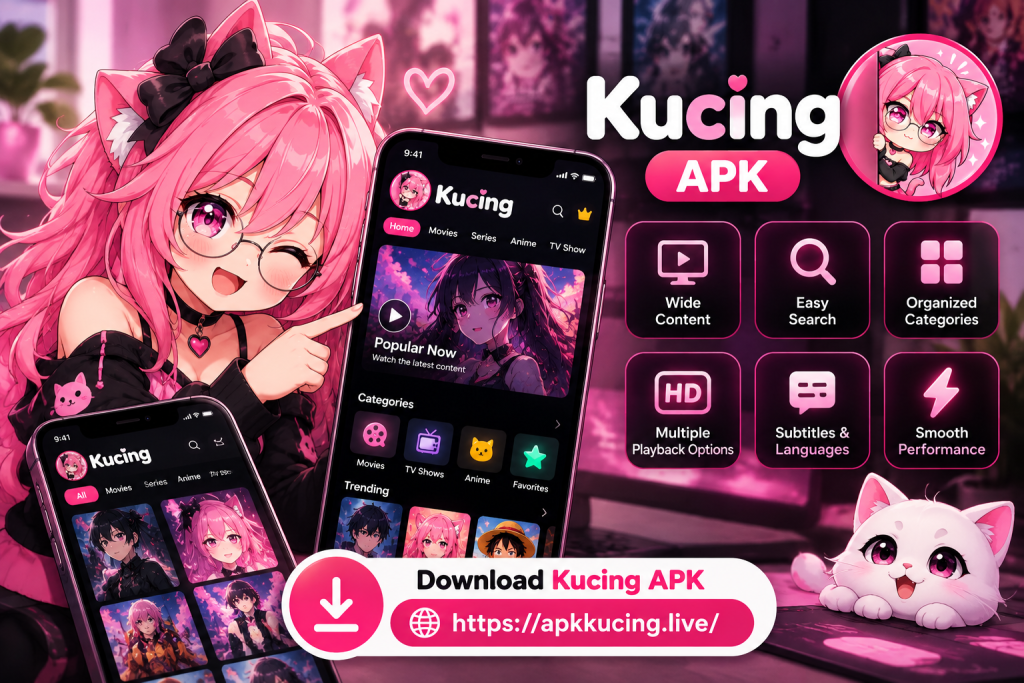
APK Kucing includes several features designed to make browsing and viewing more convenient. The available options can differ between versions, but the overall design focuses on simple navigation, content discovery, and an accessible viewing experience.
Simple and Clean Interface
The interface is designed to keep common options easy to find during everyday use. Users can move between available sections without dealing with overly complicated menus. Clear navigation helps new users understand the app more quickly. A familiar layout also makes browsing more comfortable, especially for people who prefer simple controls over crowded screens and unnecessary settings.
Multiple Content Categories
Different categories can help users organize and discover available content more easily. Instead of browsing one long list, users can explore relevant sections based on their interests. This approach can reduce the time needed to find something suitable. Category availability may change with different releases, so the exact selection can depend on the installed APK version.
Search and Discovery
A search function can make content discovery faster when users already know what they want to find. Rather than scrolling through multiple sections, users can enter a relevant title or keyword and check the available results. Search performance may depend on the current app version and available content, so results can change as the application receives updates.
Streaming Options
APK Kucing can provide access to available viewing options through its Android interface. Users can select a preferred item and check the playback choices offered by the current version. The actual viewing experience may depend on the source, internet connection, device performance, and video availability. Users should also remember that streaming options can change between different releases.
Subtitle Support
Subtitle availability can make content easier to understand when the original language differs from the viewer’s preference. Where subtitles are provided, users may be able to select an available language during playback. However, subtitle choices are not necessarily available for every title. Their availability can depend on the content source, selected video, and version of the application.
Regular App Updates
Updates can improve compatibility, fix technical problems, and refine the overall application experience. New releases may also change existing features or introduce additional options. Users should check the version information before installing an updated APK. Keeping track of releases can help users avoid compatibility problems and ensures they understand which features are included in the version they choose.
Kucing APK Content and Categories
One reason users search for Kucing APK is to find an Android-friendly way to browse entertainment content.
The content available through the application can change over time. Categories, titles, languages, and playback options may therefore differ between releases.
English and Indonesian Content
Language support depends on the specific content and version available. If you are looking for English or Indonesian subtitles, check the individual title’s available language options instead of assuming that every item provides the same choices.
Kucing APK Variants
You may encounter several names associated with Kucing while searching online. These should not automatically be treated as identical applications.
Standard Kucing APK
The standard Kucing APK refers to the regular application release available for Android installation.
Kucing Pink APK
Kucing Pink APK is another search term users may encounter when looking for Kucing-related applications. Before installing such a file, verify exactly what application it contains and whether it corresponds to the version you are looking for.
Other Kucing Variants
Different websites may use similar names for different APK files. Always check the application name, version, developer or distributor information, file size, and source before installing an unfamiliar variant.
Kucing Mod APK
A Kucing Mod APK is different from a standard APK because it may have been altered by a third party.
Modified files can introduce additional risks because their contents may not be identical to the original application. If you specifically want information about modified releases, it is better to evaluate them separately rather than assuming they have the same properties as the standard APK.
Kucing APK: Original vs Mod APK
The terms original APK and Mod APK should not be used interchangeably.
| Feature | Standard Kucing APK | Kucing Mod APK |
|---|---|---|
| Source | Regular release | Modified third-party release |
| Code | Intended application version | May have altered code |
| Updates | Depends on the original release | Depends on the distributor |
| Stability | Depends on the release | Can vary significantly |
| Security | Source and file should still be checked | Additional caution is recommended |
| Features | Standard functionality | May contain modifications |
If reliability and predictable updates are important, users should understand exactly which type of APK they are downloading.
How to Download APK Kucing
Downloading an APK file is straightforward when you use a reliable source and check the file details before installation. Follow these steps:
Check the file: Review the downloaded file before opening it. Avoid installing files from suspicious sources or unexpected downloads.
Visit a trusted source: Open the website providing the APK Kucing download.
Find the download section: Locate the page or button for the available APK file.
Select the latest version: Check the version number, file size, and Android requirements before downloading.
Start the download: Tap the download button and wait until the APK file finishes downloading.
How to Install Kucing APK on Android
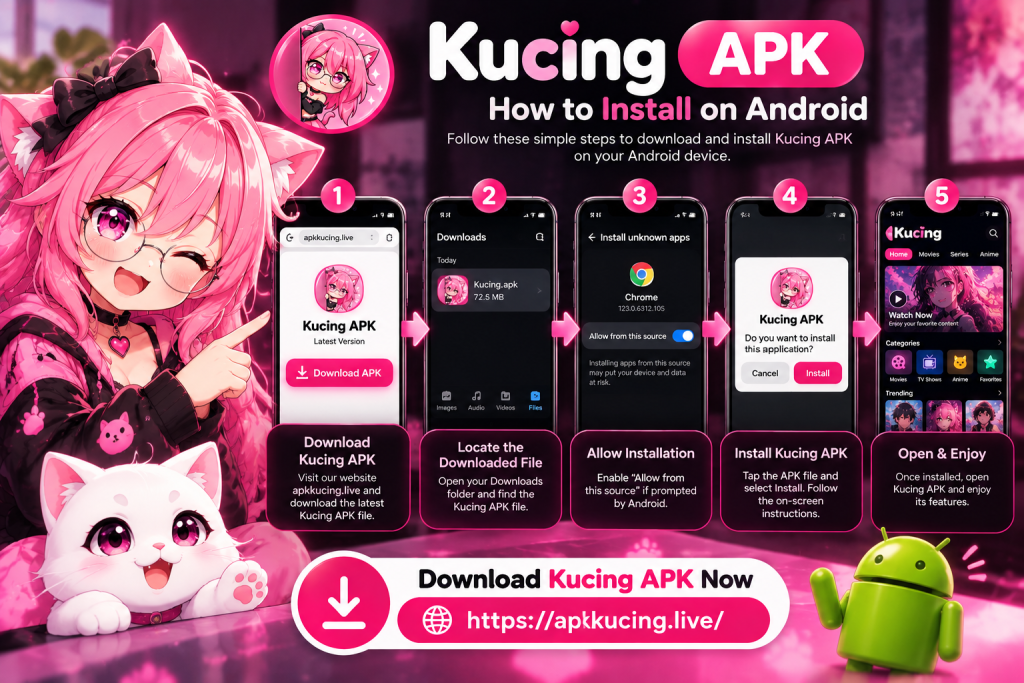
After downloading the APK, installation only takes a few steps. Android may require permission before installing an application obtained outside the Play Store.
Enable Installation Permission
Open your Android Settings and find the security or app-installation section. Depending on your Android version, this option may appear under Install unknown apps or a similar setting. Select the browser or file manager you used to open the APK, then allow installation from that source when required.
Install the APK
Open your Downloads folder and locate the APK Kucing file. Tap the file to start the installation process, then review the permissions shown by Android. Select Install and wait for the process to complete. If Android displays a warning, review it carefully before continuing.
Open and Configure the App
Once installation finishes, tap Open to launch the application. Review any initial settings or permissions requested during the first launch. Configure the available options according to your preferences, then explore the main interface. If something does not work correctly, check device compatibility and the APK version before trying another installation.
Kucing APK System Requirements
Before installing Kucing APK for Android, make sure your device is compatible with the particular release.
Important factors include:
| Requirement | What to Check |
|---|---|
| Android version | Check the version supported by the APK |
| Storage | Make sure enough free space is available |
| RAM | Sufficient memory can improve general app performance |
| Internet | Online content may require a stable connection |
| Permissions | Review permissions requested during installation or first launch |
Exact requirements can change between releases, so use the information supplied with the specific version rather than relying on an old requirement list.
How to Update Kucing APK
If a newer Kucing App Latest Version becomes available, users can normally update by obtaining the newer compatible APK and installing it over the existing version.
Before updating:
- Check the new version number.
- Read any available update information.
- Make sure the APK comes from a trustworthy source.
- Ensure sufficient storage is available.
- Keep important data backed up where appropriate.
If the new version creates compatibility problems, you may need to investigate whether the issue is specific to your device or the particular release.
Troubleshooting
APK installation and playback problems can happen for several reasons. The following solutions cover some of the most common issues.
APK Won’t Install
If the APK does not install:
- Check that the download completed successfully.
- Make sure your device has enough storage.
- Verify Android compatibility.
- Check whether Android is blocking the installation.
- Download the file again if it appears corrupted.
Kucing APK Won’t Open
If the application installs but does not open:
- Restart your device.
- Check whether your Android version is compatible.
- Clear the application’s cache if appropriate.
- Reinstall the application using a verified compatible file.
Keeps Crashing
Repeated crashes can be caused by compatibility problems, insufficient resources, corrupted files, or bugs in a particular release.
Try restarting the device, clearing the app cache, checking available storage, and confirming that you are using a compatible version.
Videos Keep Buffering
Buffering is often related to network conditions, server availability, or the quality of the stream.
Try:
- Checking your internet connection.
- Switching between Wi-Fi and mobile data.
- Reducing playback quality when possible.
- Restarting the application.
No Sound During Playback
If video plays without audio:
- Check your device volume.
- Confirm that the media volume is enabled.
- Test another video.
- Check whether the problem occurs with other applications.
Subtitles Are Not Showing
Subtitle availability can vary by title and version. Check the playback settings and confirm that subtitles are available for the content you are watching.
App Is Not Working
If a download does not start or stops unexpectedly:
- Check your internet connection.
- Retry the download.
- Make sure enough storage is available.
- Avoid repeatedly downloading incomplete files.
App Is Running Slowly
Slow performance may result from limited device resources, background applications, network problems, or the application itself.
Close unnecessary apps, free some storage, restart the device, and check whether a compatible newer release is available.
Pros and Cons
Understanding both advantages and limitations can help users decide whether the application suits their needs.
Pros
- Easy Navigation: A straightforward layout can make common sections easier to find.
- Convenient Access: Users can explore available options directly from a compatible Android device.
- Multiple Categories: Organized sections can make browsing and content discovery more convenient.
- Simple Interface: A less complicated design can provide a more comfortable experience for everyday users.
Cons
- Third-Party APK Considerations: Downloading outside official app stores requires additional attention to the file source.
- Compatibility Can Vary: The application may behave differently across Android versions and devices.
- Manual Updates: Some APK releases may require users to download and install newer versions manually.
Is Kucing APK Safe?
There isThe safety of an APK depends heavily on where the file comes from and what it contains. Third-party APK files are not always reviewed through the same channels as applications distributed through official app stores. Users should therefore verify the download source before installing APK Kucing and avoid files shared through unknown websites, pop-ups, or suspicious links.
Before installation, scan the downloaded file with reputable security software and review the permissions requested by Android. Permissions should make sense for the application’s intended functions. Users should also keep their Android system and security tools updated. Avoid modified or repackaged APK files from unknown sources, as their contents may differ from the original application. These precautions can reduce common risks, but they cannot guarantee that every APK file is completely safe.
APK Kucing Alternatives
1. Crunchyroll
Crunchyroll is a popular streaming platform focused mainly on anime and related entertainment. Its catalog includes many well-known series, movies, and seasonal releases. The platform also provides official Android access, making it convenient for users who prefer watching content on mobile devices. Its organized interface and dedicated anime categories make it a useful alternative for users looking for a more established streaming service.
2. Netflix
Netflix is a widely recognized entertainment platform offering movies, TV shows, documentaries, and original productions. Its Android application provides a polished viewing experience with personalized recommendations and organized content categories. Users can browse different genres and continue watching across supported devices. It can be considered an alternative for people who want a broader entertainment library instead of an app focused on a specific type of content.
3. Disney+
Disney+ provides access to a large collection of movies, series, documentaries, and original productions from Disney and its associated brands. The Android application offers organized categories and a straightforward interface for browsing available titles. Users can discover content based on genres and collections while using supported mobile devices. Availability and catalog selection can vary by country and subscription plan.
4. Amazon Prime Video
Amazon Prime Video is another established entertainment platform available on Android devices. It offers movies, television series, original productions, and other video content through a dedicated application. Its interface allows users to browse categories, search for titles, and manage their viewing preferences. Content availability can differ by region and subscription, so users should check the current catalog before choosing it as an alternative.
User Experience
The overall experience can vary according to the Android device, application version, internet connection, and available content.
Interface Experience
A clean interface should make it easy to move between categories, search for content, and access playback controls.
Navigation Experience
Good navigation reduces the time needed to find specific content. Search and organized categories are particularly useful on smaller mobile screens.
Playback Experience
Playback quality depends on several factors, including the source of the content, internet connection, device performance, and the application’s current release.
Installation Experience
For users familiar with Android APK installation, the process is generally straightforward. Beginners should pay particular attention to Android’s security warnings and the source of the downloaded file.
Overall Experience
Kucing APK can be considered by Android users looking for an alternative way to access the application’s available entertainment experience. However, users should always check the specific version and source rather than assuming that every APK file found online is identical.
Frequently Asked Questions(FAQs)
What is APK Kucing?
APK Kucing is an Android application that provides users with a convenient interface for exploring available digital content. Its features and content can vary depending on the installed version.
Is APK Kucing free?
Availability and pricing can depend on the specific version and distribution source. Users should check the download page for current information before installing the application.
How do I install APK Kucing?
Download the APK file from a trusted source, review the file details, and open it from your Android device. If required, allow installation from the source you are using, then follow Android’s installation instructions.
Does APK Kucing work on Android TV?
Compatibility can vary between versions and Android TV devices. Users should check the requirements of the specific APK release before attempting installation on an Android TV device.
Is APK Kucing safe?
Safety depends on the APK source, file integrity, requested permissions, and the device being used. Scan downloaded files, avoid suspicious sources, and review permissions before installation.
Why is APK Kucing not working?
Common causes can include an outdated APK, device incompatibility, network problems, unavailable content, or a temporary application issue. Checking the latest compatible version and restarting the app can help identify the problem.
Can I use APK Kucing on a PC?
An Android-compatible environment may be required to run an Android APK on a PC. Users can potentially use a suitable Android emulator, provided the application and emulator are compatible with each other.
Final Thoughts
APK Kucing provides Android users with a simple way to explore available digital content. Its main strengths include easy navigation, organized categories, and convenient mobile access. The overall experience can vary based on the device, internet connection, and installed version. Users should check compatibility before installation, especially on older devices. Safety also remains important when using third-party APK files. Choose a trusted source, scan downloaded files, review permissions, and avoid unknown modified versions before using APK Kucing.